引言
视频地址:https://www.bilibili.com/video/BV1sNFSzAExU?p=50
LangGraph源码地址:https://github.com/langchain-ai/langgraph
多Agent有3种类型:
- 协作多Agent(Multi-agent collaboration)
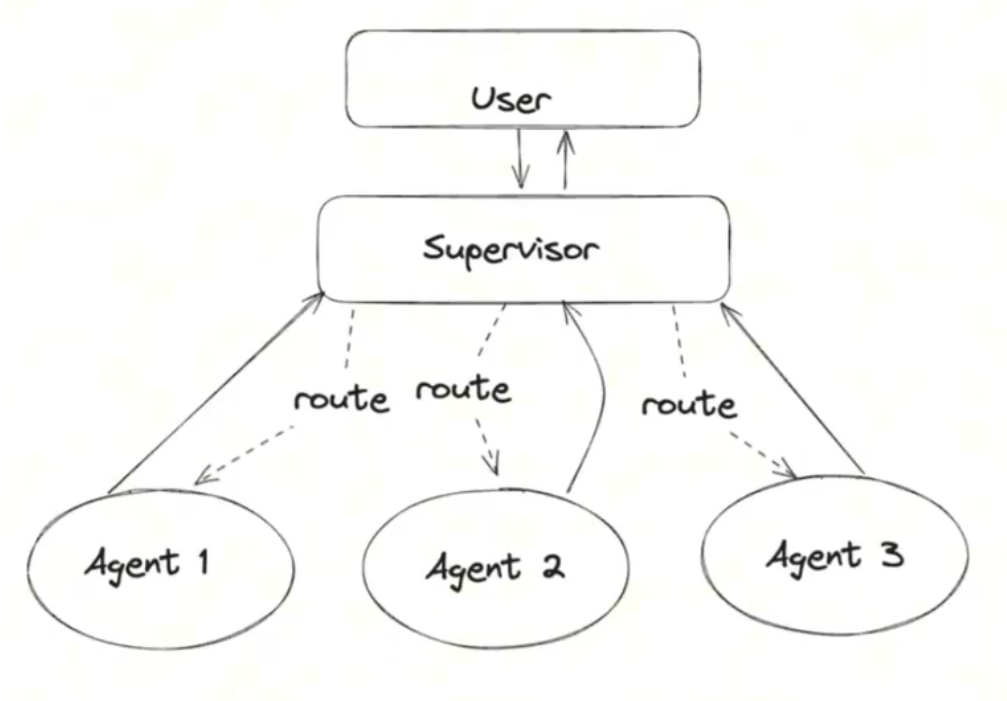
- 主管多Agent(Multi-agent supervision)
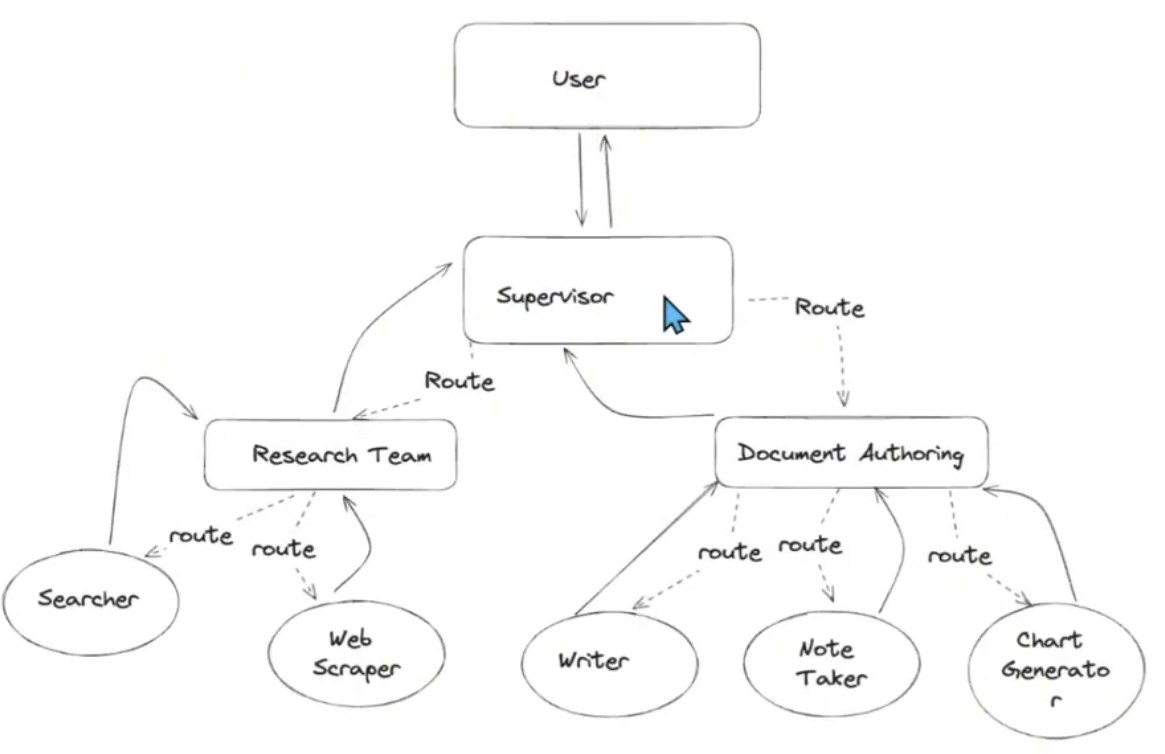
- 分层多Agent (Hierarchical Agent)
协作多Agent
架构:
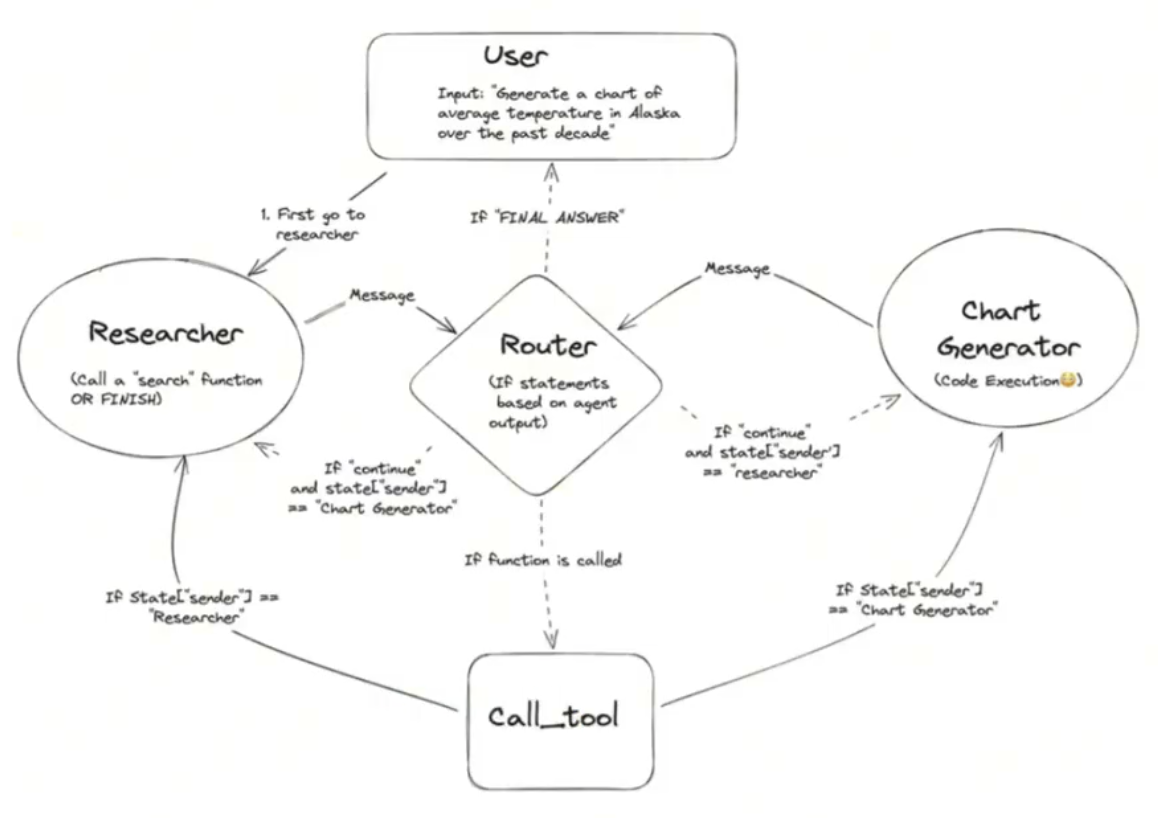
代码:
#-----------------------------------------------------------------------
# 创建Agent.下面是创建Agent的函数,指定大模型和tools,以及自定义的系统提示词

from langchain_core.messages import (
    BaseMessage,
    HumanMessage,
    ToolMessage,
)
from langchain_core.prompts import ChatPromptTemplate, MessagesPlaceholder
from langgraph.graph import END, StateGraph, START


"""
你是一个乐于助人的人工智能助手,与其他助手合作。
使用提供的工具来回答问题。
如果你不能完全回答,没关系,另一个助手用不同的工具
这将有助于你取得进展。尽你所能取得进展。
如果你或其他助理有最终答案或可交付成果,
在你的回答前加上最终答案,这样团队就知道该停下来了。
您可以访问以下工具:{tool_names}。\n {system_message}
"""


def create_agent(llm, tools, system_message: str):
    """Create an agent."""
    prompt = ChatPromptTemplate.from_messages(
        [
            (
                "system",
                "You are a helpful AI assistant, collaborating with other assistants."
                " Use the provided tools to progress towards answering the question."
                " If you are unable to fully answer, that's OK, another assistant with different tools "
                " will help where you left off. Execute what you can to make progress."
                " If you or any of the other assistants have the final answer or deliverable,"
                " prefix your response with FINAL ANSWER so the team knows to stop."
                " You have access to the following tools: {tool_names}.\n{system_message}",
            ),
            MessagesPlaceholder(variable_name="messages"),
        ]
    )
    prompt = prompt.partial(system_message=system_message)
    prompt = prompt.partial(tool_names=", ".join([tool.name for tool in tools]))
    return prompt | llm.bind_tools(tools)

#-----------------------------------------------------------------------
# 定义了2个工具,一个是搜索工具tavily_tool,一个是代码运行工具python_repl

from typing import Annotated

from langchain_community.tools.tavily_search import TavilySearchResults
from langchain_core.tools import tool
from langchain_experimental.utilities import PythonREPL


@tool
def search():
    """Search the web for information."""
    return "test"


# tavily_tool = TavilySearchResults(max_results=5)

tavily_tool = search


# Warning: This executes code locally, which can be unsafe when not sandboxed

# 是Python编程语言的一个交互式解释器环境
repl = PythonREPL()

@tool
def python_repl(
    code: Annotated[str, "The python code to execute to generate your chart."],
):
    """Use this to execute python code. If you want to see the output of a value,
    you should print it out with `print(...)`. This is visible to the user."""
    try:
        result = repl.run(code)
    except BaseException as e:
        return f"Failed to execute. Error: {repr(e)}"
    result_str = f"Successfully executed:\n```python\n{code}\n```\nStdout: {result}"
    return (
        result_str + "\n\nIf you have completed all tasks, respond with FINAL ANSWER."
    )


# ----------------------------------------------------------------------
# 定义agent状态,保存agent执行过程中的状态数据,方便后面创建agent node

import operator
from typing import Annotated, Sequence
from typing_extensions import TypedDict


# from langchain_openai import ChatOpenAI
# ollama本地部署大模型
from langchain_ollama import ChatOllama


# This defines the object that is passed between each node
# in the graph. We will create different nodes for each agent and tool
class AgentState(TypedDict):
    messages: Annotated[Sequence[BaseMessage], operator.add]
    sender: str


# ----------------------------------------------------------------------
# agent从llm, tool, system_msg创建
# agent node从agent_node函数,agent,以及name创建
# 创建agent node,创建了2个,一个是 research_node,一个是 chart_node
import functools

from langchain_core.messages import AIMessage


# Helper function to create a node for a given agent
def agent_node(state, agent, name):
    result = agent.invoke(state)
    # We convert the agent output into a format that is suitable to append to the global state
    if isinstance(result, ToolMessage):
        pass
    else:
        result = AIMessage(**result.dict(exclude={"type", "name"}), name=name)
    return {
        "messages": [result],
        # Since we have a strict workflow, we can
        # track the sender so we know who to pass to next.
        "sender": name,
    }


# llm = ChatOpenAI(model="gpt-4o")
llm = ChatOllama(
    model = "qwen2.5:7b-instruct-q4_0", # 要支持tool use的模型,一般chat模型,agent模型,coder模型都会支持
    temperature = 0.8,
    num_predict = 256,
    # other params ...
)


# Research agent and node
research_agent = create_agent(
    llm,
    [tavily_tool],
    system_message="You should provide accurate data for the chart_generator to use.",
)
research_node = functools.partial(agent_node, agent=research_agent, name="Researcher")


# chart_generator
chart_agent = create_agent(
    llm,
    [python_repl],
    system_message="Any charts you display will be visible by the user.",
)
chart_node = functools.partial(agent_node, agent=chart_agent, name="chart_generator")


# ----------------------------------------------------------------------
# 定义工具节点
from langgraph.prebuilt import ToolNode

tools = [tavily_tool, python_repl]
tool_node = ToolNode(tools)


# ----------------------------------------------------------------------
# 定义路由器router
# Either agent can decide to end
from typing import Literal


def router(state):
    # This is the router
    messages = state["messages"]
    last_message = messages[-1]
    if last_message.tool_calls:
        # The previous agent is invoking a tool
        return "call_tool"
    if "FINAL ANSWER" in last_message.content:
        # Any agent decided the work is done
        return END
    return "continue"


# ----------------------------------------------------------------------
# 定义graph, 由于可以循环, 所以不再是DAG啦, 添加节点, 再添加边, 定义初始节点, 生成graph
workflow = StateGraph(AgentState)

workflow.add_node("Researcher", research_node)
workflow.add_node("chart_generator", chart_node)
workflow.add_node("call_tool", tool_node)

workflow.add_conditional_edges(
    "Researcher",
    router,
    {"continue": "chart_generator", "call_tool": "call_tool", END: END},
)

workflow.add_conditional_edges(
    "chart_generator",
    router,
    {"continue": "Researcher", "call_tool": "call_tool", END: END},
)

workflow.add_conditional_edges(
    "call_tool",
    # Each agent node updates the 'sender' field
    # the tool calling node does not, meaning
    # this edge will route back to the original agent
    # who invoked the tool
    lambda x: x["sender"],
    {
        "Researcher": "Researcher",
        "chart_generator": "chart_generator",
    },
)

workflow.add_edge(START, "Researcher")
graph = workflow.compile()


# ----------------------------------------------------------------------
# 调用graph,得到结果
events = graph.stream(
    {
        "messages": [
            HumanMessage(
                content="Fetch the UK's GDP over the past 5 years,"
                " then draw a line graph of it."
                " Once you code it up, finish."
            )
        ],
    },
    # Maximum number of steps to take in the graph
    {"recursion_limit": 150},
)

for s in events:
    print(s)
    print("-----")


# ----------------------------------------------------------------------
# 可以把生成的graph结构显示出来
from IPython.display import Image, display

try:
    display(Image(graph.get_graph(xray=True).draw_mermaid_png()))
except Exception:
    # This requires some extra dependencies and is optional
    pass
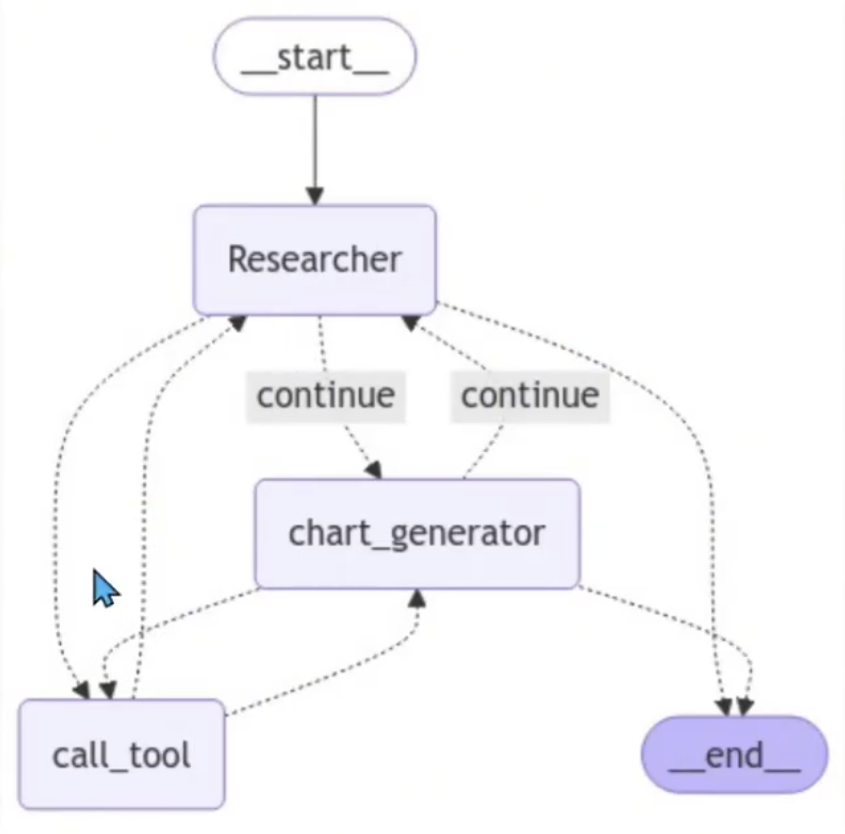
Graph结构图:
主管多Agent
架构图:
代码:
# 创建tool,各种agent架构都一样
# ----------------------------------------------------------------------
from typing import Annotated

from langchain_community.tools.tavily_search import TavilySearchResults
from langchain_experimental.tools import PythonREPLTool


@tool
def search():
    """Search the web for information."""
    return "test"


# tavily_tool = TavilySearchResults(max_results=5)
tavily_tool = search

# This executes code locally, which can be unsafe
python_repl_tool = PythonREPLTool()


# ----------------------------------------------------------------------
# agent node方法
from langchain_core.messages import HumanMessage

'''
Define a helper function that we will use to create the nodes in the graph -
it takes care of converting the agent response to a human message.
This is important because that is how we will add it the global state of the graph
'''

# 通过这个函数将 message添加到全局
def agent_node(state, agent, name):
    result = agent.invoke(state)
    return {
        "messages": [HumanMessage(content=result["messages"][-1].content, name=name)]
    }


# ----------------------------------------------------------------------
# 创建主管Agent
# 它将使用函数调用来选择下一个工作节点或完成处理
from langchain_core.prompts import ChatPromptTemplate, MessagesPlaceholder
from langchain_openai import ChatOpenAI
from pydantic import BaseModel
from typing import Literal


# 系统提示词用在了 主管Agent
members = ["Researcher", "Coder"]
system_prompt = (
    "You are a supervisor tasked with managing a conversation between the"
    " following workers: {members}. Given the following user request,"
    " respond with the worker to act next. Each worker will perform a"
    " task and respond with their results and status. When finished,"
    " respond with FINISH."
)

# Our team supervisor is an LLM node. It just picks the next agent to process
# and decides when the work is completed
options = ["FINISH"] + members


class routeResponse(BaseModel):
    next: Literal[*options]


prompt = ChatPromptTemplate.from_messages(
    [
        ("system", system_prompt),
        MessagesPlaceholder(variable_name="messages"),
        (
            "system",
            "Given the conversation above, who should act next?"
            " Or should we FINISH? Select one of: {options}",
        ),
    ]
).partial(options=str(options), members=", ".join(members))


llm = ChatOpenAI(model="gpt-4o")

def supervisor_agent(state):
    supervisor_chain = prompt | llm.with_structured_output(routeResponse)
    return supervisor_chain.invoke(state)


# ----------------------------------------------------------------------
# 创建graph节点,agent采用ReAct
import functools
import operator
from typing import Sequence
from typing_extensions import TypedDict

from langchain_core.messages import BaseMessage

from langgraph.graph import END, StateGraph, START
from langgraph.prebuilt import create_react_agent


# The agent state is the input to each node in the graph
class AgentState(TypedDict):
    # The annotation tells the graph that new messages will always
    # be added to the current states
    messages: Annotated[Sequence[BaseMessage], operator.add]
    # The 'next' field indicates where to route to next
    next: str


research_agent = create_react_agent(llm, tools=[tavily_tool])
research_node = functools.partial(agent_node, agent=research_agent, name="Researcher")

# NOTE: THIS PERFORMS ARBITRARY CODE EXECUTION. PROCEED WITH CAUTION
code_agent = create_react_agent(llm, tools=[python_repl_tool])
code_node = functools.partial(agent_node, agent=code_agent, name="Coder")

workflow = StateGraph(AgentState)
workflow.add_node("Researcher", research_node)
workflow.add_node("Coder", code_node)
workflow.add_node("supervisor", supervisor_agent)


# ----------------------------------------------------------------------
# 添加边,添加主管agent为开始节点,生成graph
for member in members:
    # We want our workers to ALWAYS "report back" to the supervisor when done
    workflow.add_edge(member, "supervisor")

# The supervisor populates the "next" field in the graph state
# which routes to a node or finishes
conditional_map = {k: k for k in members}
conditional_map["FINISH"] = END
workflow.add_conditional_edges("supervisor", lambda x: x["next"], conditional_map)

# Finally, add entrypoint
workflow.add_edge(START, "supervisor")

graph = workflow.compile()

# ----------------------------------------------------------------------
# 执行图
for s in graph.stream(
    {
        "messages": [
            HumanMessage(content="Code hello world and print it to the terminal")
        ]
    }
):
    if "__end__" not in s:
        print(s)
        print("-----")
分层多Agent
架构图:
代码示例:
- 定义Agenti访问web和写入文件的工具
- 定义一些实用程序来帮助创建图形和Agent
- 创建和定义每个团队(网络研究+文档写作)
- 把一切都组合在一起。
每个团队将由一名或多名Agent组成,每个Agent都有一个或多个工具。下面,定义不同团队使用的所有工具。
建立研究团队:
# 研究团队工具,爬虫工具
from typing import Annotated, List

from langchain_community.document_loaders import WebBaseLoader
from langchain_community.tools.tavily_search import TavilySearchResults
from langchain_core.tools import tool

# 需要api_key,不然会报错
tavily_tool = TavilySearchResults(max_results=5)


@tool
def scrape_webpages(urls: List[str]) -> str:
    """Use requests and bs4 to scrape the provided web pages for detailed information."""
    loader = WebBaseLoader(urls)
    docs = loader.load()
    return "\n\n".join(
        [
            f'<Document name="{doc.metadata.get("title", "")}">\n{doc.page_content}\n</Document>'
            for doc in docs
        ]
    )


# 文档编写团队工具
from pathlib import Path
from tempfile import TemporaryDirectory
from typing import Dict, Optional

from langchain_experimental.utilities import PythonREPL
from typing_extensions import TypedDict

_TEMP_DIRECTORY = TemporaryDirectory()
WORKING_DIRECTORY = Path(_TEMP_DIRECTORY.name)


# 大纲工具
@tool
def create_outline(
    points: Annotated[List[str], "List of main points or sections."],
    file_name: Annotated[str, "File path to save the outline."],
) -> Annotated[str, "Path of the saved outline file."]:
    """Create and save an outline."""
    with (WORKING_DIRECTORY / file_name).open("w") as file:
        for i, point in enumerate(points):
            file.write(f"{i + 1}. {point}\n")
    return f"Outline saved to {file_name}"


# 文档阅读工具
@tool
def read_document(
    file_name: Annotated[str, "File path to save the document."],
    start: Annotated[Optional[int], "The start line. Default is 0"] = None,
    end: Annotated[Optional[int], "The end line. Default is None"] = None,
) -> str:
    """Read the specified document."""
    with (WORKING_DIRECTORY / file_name).open("r") as file:
        lines = file.readlines()
    if start is not None:
        start = 0
    return "\n".join(lines[start:end])


# 写文档工具
@tool
def write_document(
    content: Annotated[str, "Text content to be written into the document."],
    file_name: Annotated[str, "File path to save the document."],
) -> Annotated[str, "Path of the saved document file."]:
    """Create and save a text document."""
    with (WORKING_DIRECTORY / file_name).open("w") as file:
        file.write(content)
    return f"Document saved to {file_name}"


# 编辑文档工具
@tool
def edit_document(
    file_name: Annotated[str, "Path of the document to be edited."],
    inserts: Annotated[
        Dict[int, str],
        "Dictionary where key is the line number (1-indexed) and value is the text to be inserted at that line.",
    ],
) -> Annotated[str, "Path of the edited document file."]:
    """Edit a document by inserting text at specific line numbers."""
    with (WORKING_DIRECTORY / file_name).open("r") as file:
        lines = file.readlines()

    sorted_inserts = sorted(inserts.items())

    for line_number, text in sorted_inserts:
        if 1 <= line_number <= len(lines) + 1:
            lines.insert(line_number - 1, text + "\n")
        else:
            return f"Error: Line number {line_number} is out of range."

    with (WORKING_DIRECTORY / file_name).open("w") as file:
        file.writelines(lines)

    return f"Document edited and saved to {file_name}"


# Warning: This executes code locally, which can be unsafe when not sandboxed
repl = PythonREPL()


# 代码执行工具
@tool
def python_repl(
    code: Annotated[str, "The python code to execute to generate your chart."],
):
    """Use this to execute python code. If you want to see the output of a value,
    you should print it out with `print(...)`. This is visible to the user."""
    try:
        result = repl.run(code)
    except BaseException as e:
        return f"Failed to execute. Error: {repr(e)}"
    return f"Successfully executed:\n```python\n{code}\n```\nStdout: {result}"


# 创建一个 worker agent。为子图创建一个主管。
from typing import List, Optional
from langchain.output_parsers.openai_functions import JsonOutputFunctionsParser
from langchain_core.prompts import ChatPromptTemplate, MessagesPlaceholder
from langchain_openai import ChatOpenAI

from langgraph.graph import END, StateGraph, START
from langchain_core.messages import HumanMessage, trim_messages

llm = ChatOpenAI(model="gpt-4o-mini")

trimmer = trim_messages(
    max_tokens=100000,
    strategy="last",
    token_counter=llm,
    include_system=True,
)


def agent_node(state, agent, name):
    result = agent.invoke(state)
    return {
        "messages": [HumanMessage(content=result["messages"][-1].content, name=name)]
    }


# 主管定义函数,可以创建子团队的主管,也可以创建大主管
# 自己写function call的提示词
def create_team_supervisor(llm: ChatOpenAI, system_prompt, members) -> str:
    """An LLM-based router."""
    options = ["FINISH"] + members
    function_def = {
        "name": "route",
        "description": "Select the next role.",
        "parameters": {
            "title": "routeSchema",
            "type": "object",
            "properties": {
                "next": {
                    "title": "Next",
                    "anyOf": [
                        {"enum": options},
                    ],
                }
            },
            "required": ["next"],
        },
    }
    prompt = ChatPromptTemplate.from_messages(
        [
            ("system", system_prompt),
            MessagesPlaceholder(variable_name="messages"),
            (
                "system",
                "Given the conversation above, who should act next?"
                " Or should we FINISH? Select one of: {options}",
            ),
        ]
    ).partial(options=str(options), team_members=", ".join(members))
    return (
        prompt
        | trimmer
        | llm.bind_functions(functions=[function_def], function_call="route")
        | JsonOutputFunctionsParser()
    )

# bind_functions属于比较遗弃方法,新的用bind_tools,如果是要换成本地部署的ollama模型,需要注意langchain_ollama的版本
# 或者修改提示词描述的形式,改成tool定义


'''
定义Agent团队,现在我们可以定义我们的分层团队了。
研究团队
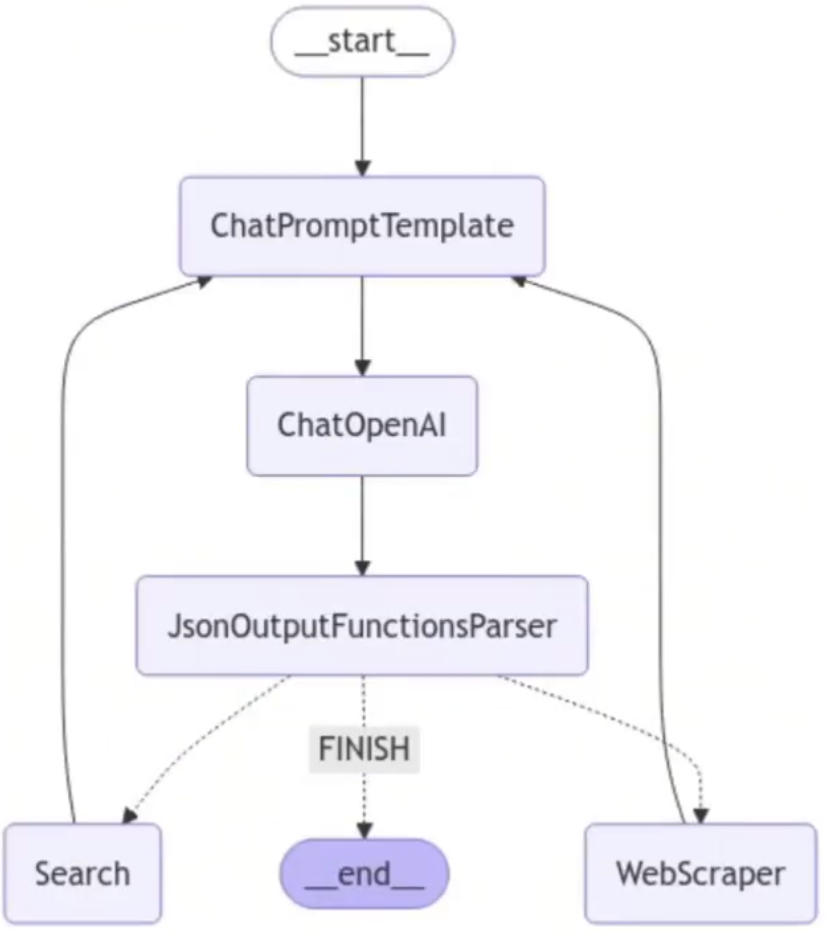
研究团队将有一个搜索Agent和一个网络抓取"research_agent"作为两个工作节点,以及团队主管
'''

import functools
import operator

from langchain_core.messages import BaseMessage, HumanMessage
from langchain_openai.chat_models import ChatOpenAI
from langgraph.prebuilt import create_react_agent


# 定义state
# ResearchTeam graph state
class ResearchTeamState(TypedDict):
    # A message is added after each team member finishes
    messages: Annotated[List[BaseMessage], operator.add]
    # The team members are tracked so they are aware of
    # the others' skill-sets
    team_members: List[str]
    # Used to route work. The supervisor calls a function
    # that will update this every time it makes a decision
    next: str


llm = ChatOpenAI(model="gpt-4o")

search_agent = create_react_agent(llm, tools=[tavily_tool])
search_node = functools.partial(agent_node, agent=search_agent, name="Search")

research_agent = create_react_agent(llm, tools=[scrape_webpages])
research_node = functools.partial(agent_node, agent=research_agent, name="WebScraper")


# 创建子团队主管
supervisor_agent = create_team_supervisor(
    llm,
    "You are a supervisor tasked with managing a conversation between the"
    " following workers:  Search, WebScraper. Given the following user request,"
    " respond with the worker to act next. Each worker will perform a"
    " task and respond with their results and status. When finished,"
    " respond with FINISH.",
    ["Search", "WebScraper"],
)

research_graph = StateGraph(ResearchTeamState)
research_graph.add_node("Search", search_node)
research_graph.add_node("WebScraper", research_node)
research_graph.add_node("supervisor", supervisor_agent)

# Define the control flow
research_graph.add_edge("Search", "supervisor")
research_graph.add_edge("WebScraper", "supervisor")
research_graph.add_conditional_edges(
    "supervisor",
    lambda x: x["next"],
    {"Search": "Search", "WebScraper": "WebScraper", "FINISH": END},
)

research_graph.add_edge(START, "supervisor")
chain = research_graph.compile()


# The following functions interoperate between the top level graph state
# and the state of the research sub-graph
# this makes it so that the states of each graph don't get intermixed
def enter_chain(message: str):
    results = {
        "messages": [HumanMessage(content=message)],
    }
    return results


research_chain = enter_chain | chain


# 可以显示 graph结构
'''
from IPython.display import Image, display
display(Image(chain.get_graph(xray=True).draw_mermaid_png()))
'''


# 运行研究团队
'''
for s in research_chain.stream(
    "when is Taylor Swift's next tour?", {"recursion_limit": 100}
):
    if "__end__" not in s:
        print(s)
        print("---")
'''
研究团队graph结构:
建立文档团队:
'''
文档编写团队
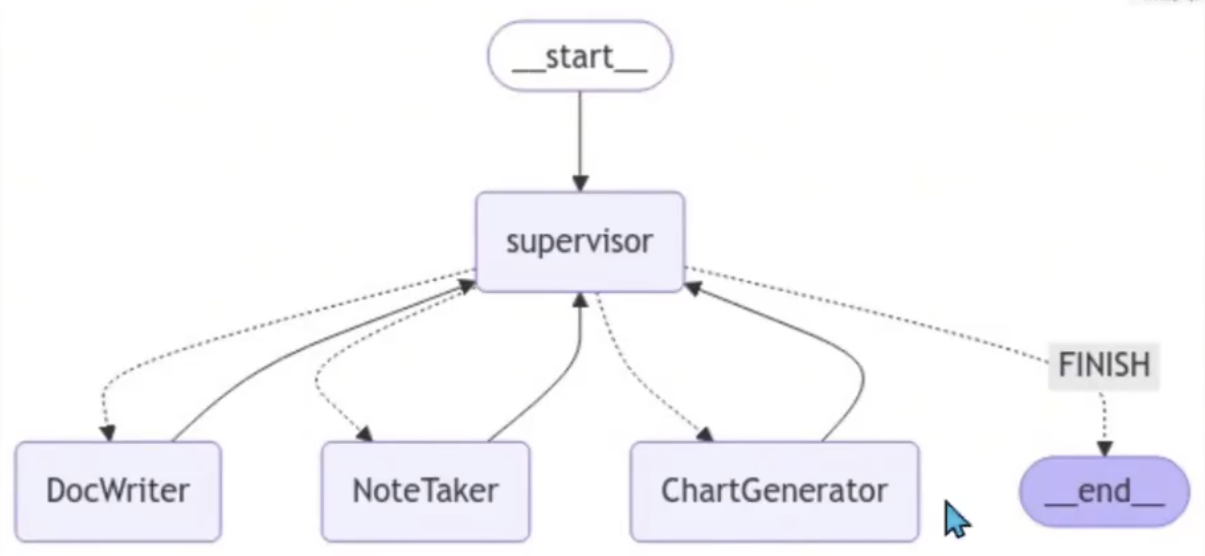
使用类似的方法创建下面的文档编写团队。这一次,我们将为每个Agent提供对不同文件写入工具的访问权限。
请注意,我们在这里为我们的Agent提供文件系统访问权限,这在所有情况下都是不安全的。
'''

import operator
from pathlib import Path


# Document writing team graph state
class DocWritingState(TypedDict):
    # This tracks the team's conversation internally
    messages: Annotated[List[BaseMessage], operator.add]
    # This provides each worker with context on the others' skill sets
    team_members: str
    # This is how the supervisor tells langgraph who to work next
    next: str
    # This tracks the shared directory state
    current_files: str


# 这将在每个 worker agent 开始工作之前运行
# 这使他们更加了解当前的状态
# 工作目录
# This will be run before each worker agent begins work
# It makes it so they are more aware of the current state
# of the working directory.
def prelude(state):
    written_files = []
    if not WORKING_DIRECTORY.exists():
        WORKING_DIRECTORY.mkdir()
    try:
        written_files = [
            f.relative_to(WORKING_DIRECTORY) for f in WORKING_DIRECTORY.rglob("*")
        ]
    except Exception:
        pass
    if not written_files:
        return {**state, "current_files": "No files written."}
    return {
        **state,
        "current_files": "\nBelow are files your team has written to the directory:\n"
        + "\n".join([f" - {f}" for f in written_files]),
    }

llm = ChatOpenAI(model="gpt-4o")

doc_writer_agent = create_react_agent(
    llm, tools=[write_document, edit_document, read_document]
)
# Injects current directory working state before each call
context_aware_doc_writer_agent = prelude | doc_writer_agent
doc_writing_node = functools.partial(
    agent_node, agent=context_aware_doc_writer_agent, name="DocWriter"
)

note_taking_agent = create_react_agent(llm, tools=[create_outline, read_document])
context_aware_note_taking_agent = prelude | note_taking_agent
note_taking_node = functools.partial(
    agent_node, agent=context_aware_note_taking_agent, name="NoteTaker"
)

chart_generating_agent = create_react_agent(llm, tools=[read_document, python_repl])
context_aware_chart_generating_agent = prelude | chart_generating_agent
chart_generating_node = functools.partial(
    agent_node, agent=context_aware_chart_generating_agent, name="ChartGenerator"
)


# 创建子团队主管
"""
你是一名主管,负责管理
以下workers: {team_members}。给定以下用户请求
与worker一起响应以采取下一步行动。每个worker将执行一个
任务并回复其结果和状态。完成后,
用FINISH回复。
"""
doc_writing_supervisor = create_team_supervisor(
    llm,
    "You are a supervisor tasked with managing a conversation between the"
    " following workers: {team_members}. Given the following user request,"
    " respond with the worker to act next. Each worker will perform a"
    " task and respond with their results and status. When finished,"
    " respond with FINISH.",
    ["DocWriter", "NoteTaker", "ChartGenerator"],
)


# 添加节点,添加边
# Create the graph here:
# Note that we have unrolled the loop for the sake of this doc
authoring_graph = StateGraph(DocWritingState)
authoring_graph.add_node("DocWriter", doc_writing_node)
authoring_graph.add_node("NoteTaker", note_taking_node)
authoring_graph.add_node("ChartGenerator", chart_generating_node)
authoring_graph.add_node("supervisor", doc_writing_supervisor)

# Add the edges that always occur
authoring_graph.add_edge("DocWriter", "supervisor")
authoring_graph.add_edge("NoteTaker", "supervisor")
authoring_graph.add_edge("ChartGenerator", "supervisor")

# Add the edges where routing applies
authoring_graph.add_conditional_edges(
    "supervisor",
    lambda x: x["next"],
    {
        "DocWriter": "DocWriter",
        "NoteTaker": "NoteTaker",
        "ChartGenerator": "ChartGenerator",
        "FINISH": END,
    },
)

authoring_graph.add_edge(START, "supervisor")
chain = authoring_graph.compile()


# 以下函数在顶层图形状态之间进行互操作
# 以及研究子图的状态
# 这使得每个图的状态不会混合在一起
# The following functions interoperate between the top level graph state
# and the state of the research sub-graph
# this makes it so that the states of each graph don't get intermixed
def enter_chain(message: str, members: List[str]):
    results = {
        "messages": [HumanMessage(content=message)],
        "team_members": ", ".join(members),
    }
    return results

# We reuse the enter/exit functions to wrap the graph
authoring_chain = (
    functools.partial(enter_chain, members=authoring_graph.nodes)
    | authoring_graph.compile()
)


# 显示graph结构
'''
from IPython.display import Image, display

display(Image(chain.get_graph().draw_mermaid_png()))
'''


# 运行文档团队
'''
for s in authoring_chain.stream(
    "write an outline for poem and then write the poem to disk.",
    {"recursion_limit": 100},
):
    if "__end__" not in s:
        print(s)
        print("---")
'''
文档团队graph结构
添加主管层:
'''
添加层
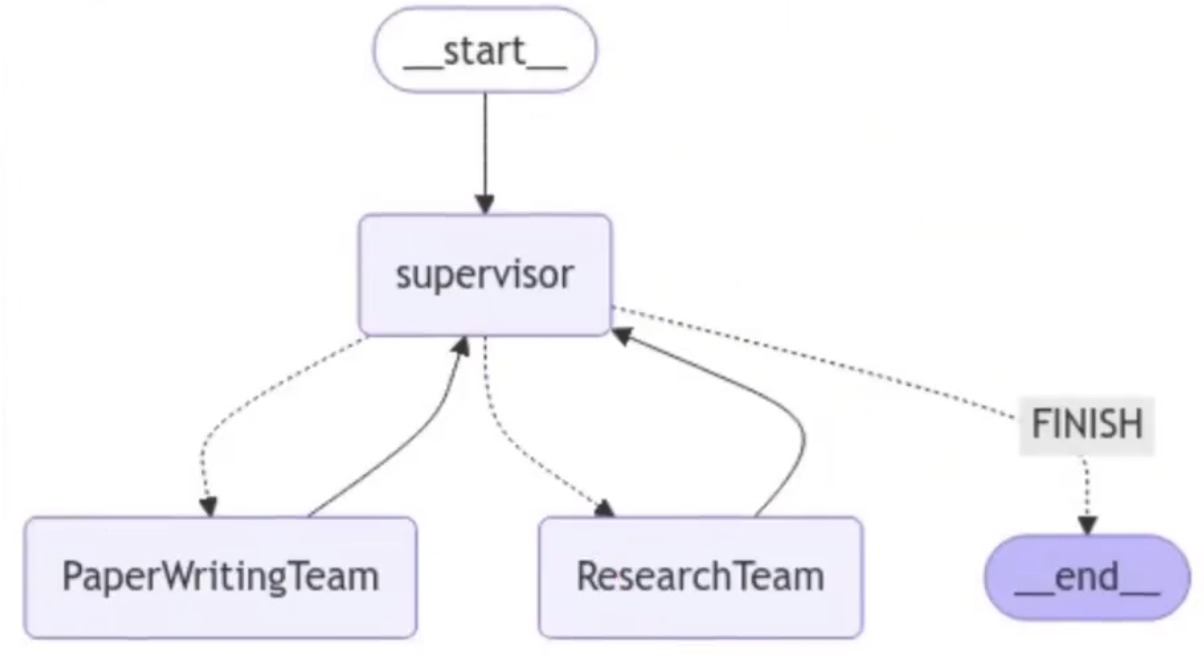
在这个设计中,我们执行自上而下的规划策略。我们已经创建了两个图,但我们必须决定如何在两者之间路由工作。
我们将创建第三个图来编排前两个图,并添加一些连接器来定义如何在不同图之间共享此顶级状态。
'''

from langchain_core.messages import BaseMessage
from langchain_openai.chat_models import ChatOpenAI

llm = ChatOpenAI(model="gpt-4o")

# 创建大主管
supervisor_node = create_team_supervisor(
    llm,
    "You are a supervisor tasked with managing a conversation between the"
    " following teams: {team_members}. Given the following user request,"
    " respond with the worker to act next. Each worker will perform a"
    " task and respond with their results and status. When finished,"
    " respond with FINISH.",
    ["ResearchTeam", "PaperWritingTeam"],
)


# Top-level graph state
class State(TypedDict):
    messages: Annotated[List[BaseMessage], operator.add]
    next: str


def get_last_message(state: State) -> str:
    return state["messages"][-1].content


def join_graph(response: dict):
    return {"messages": [response["messages"][-1]]}


# Define the graph.
super_graph = StateGraph(State)
# First add the nodes, which will do the work
super_graph.add_node("ResearchTeam", get_last_message | research_chain | join_graph)
super_graph.add_node(
    "PaperWritingTeam", get_last_message | authoring_chain | join_graph
)
super_graph.add_node("supervisor", supervisor_node)

# 定义图形连接,控制逻辑的方式
# 通过程序传播
# Define the graph connections, which controls how the logic
# propagates through the program
super_graph.add_edge("ResearchTeam", "supervisor")
super_graph.add_edge("PaperWritingTeam", "supervisor")
super_graph.add_conditional_edges(
    "supervisor",
    lambda x: x["next"],
    {
        "PaperWritingTeam": "PaperWritingTeam",
        "ResearchTeam": "ResearchTeam",
        "FINISH": END,
    },
)

super_graph.add_edge(START, "supervisor")
super_graph = super_graph.compile()


# 显示graph结构
'''
from IPython.display import Image, display

display(Image(super_graph.get_graph().draw_mermaid_png()))
'''


# 运行整个Agent团队
'''
for s in super_graph.stream(
    {
        "messages": [
            HumanMessage(
                content="Write a brief research report on the North American sturgeon. Include a chart."
            )
        ],
    },
    {"recursion_limit": 150},
):
    if "__end__" not in s:
        print(s)
        print("---")
'''
主管层graph结构
参考资料
LangGraph实战教程:构建会思考、能记忆、可人工干预的多智能体AI系统:https://cloud.tencent.com/developer/article/2557143